Live Translation
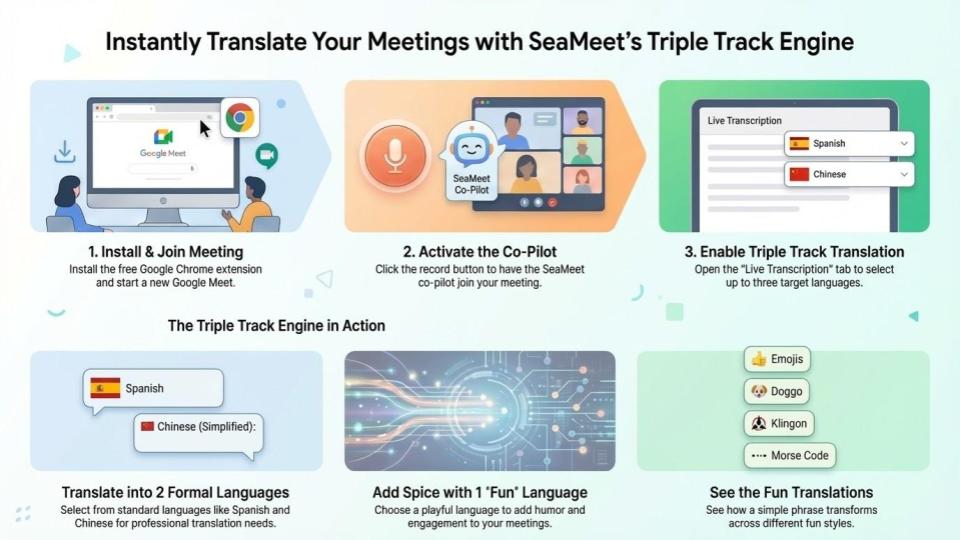
SeaMeet is an AI-powered “Agentic Meeting Copilot” designed to enhance productivity for individuals and high-performance teams. It provides real-time transcription, multi-language translation, and unique “fun” translation filters (Triple Track Translation) for both online and offline meetings.
1. Prerequisites
To use SeaMeet, you will need:
- A Google account (for Google Meet integration).
- A Chromium-based browser (Google Chrome, Microsoft Edge, etc.).
2. Installation
- Visit the Official Website: Head to SeaMeet.ai to sign up for a free account.
- Install the Extension: Download the SeaMeet Chrome Extension from the Google Chrome Web Store.
- Sign In: Once installed, click the extension icon and log in with your SeaMeet credentials.
3. Starting a Meeting with SeaMeet
- Launch a Meeting: Open Google Meet and start a new meeting or join an existing one.
- Activate the Copilot: On the left-hand side of your Google Meet screen, you will see the SeaMeet widget. Click “Start Recording."
- Admit the Bot: A “SeaMeet Copilot” will request to join the meeting. The meeting host must click “Admit” to allow the bot to begin transcribing.
4. Real-Time Transcription and Translation
Once the Copilot is in the meeting:
- Open the Dashboard: Click the “Transcription & Translation” tab in the SeaMeet widget. This will open the SeaMeet back-end interface.
- Enable Translation: By default, translation is disabled. Click the “Translate” dropdown menu.
- Standard Translation: Select up to two standard languages to see live parallel translations of the speaker’s words. Supported formal languages include:
- English (United States)
- Español (España)
- Español (Latinoamérica)
- Français (France)
- Deutsch (Deutschland)
- Dansk (Denmark)
- Polski (Polska)
- ไทย (ประเทศไทย)
- हिन्दी (भारत)
- Tiếng Việt (Việt Nam)
- 한국어 (대한민국)
- 日本語 (日本)
- Bahasa Melayu (Malaysia)
- Filipino (Pilipinas)
- 广东话 (简体)
- 廣東話 (香港繁體)
- 國語 (台灣繁體)
- 普通话 (中国简体)
- العربية (Arabic)
- فارسی (Farsi)
5. Using “Triple Track” (Fun) Translations
SeaMeet allows you to “Spice it up” by adding a third, fun translation track:
-
In the translation menu, click the “Spice it up!" tab.
-
Choose from a variety of “fun” languages, including:
Fantasy & Fictional:
- Klingon
- Dothraki
- Elvish
- Minionese
Digital & Nerdy:
- Morse Code
- Emoji-only (semantic translation into icons)
Cute & Internet Culture:
- “UwU speak” (cutesy anime style)
- Doggo speak
Historical & Character:
- Shakespearean English
- Pirate Speak
- Yoda Speak
Global Flavors & Dialects:
- Spanglish
- Chinglish
- Singlish
Utility Styles:
- Shorthand/Texting (compressing speech into rapid text)
-
The live feed will now display the original text, the standard translation, and the “fun” version simultaneously.
6. Post-Meeting Review
After the meeting ends, you can visit your workspace at SeaMeet.ai to view:
- Full meeting transcripts.
- Summaries and action items.
- All generated translations.