Zapier Integration
Seasalt.ai Agentic Send: Simplified Zapier Automation Guide
Prerequisites
- A Zapier account.
- A Seasalt.ai account (connected to your messaging channels like SMS or WhatsApp).
- A trigger app (e.g., Google Calendar, Google Sheets, Typeform).
The Seasalt.ai Agentic Send is a powerful feature designed to radically simplify complicated, multi-step Zapier automation workflows. It collapses typically fragile, multi-step configurations (which might otherwise involve five, ten, or even seventeen steps) into a single action step—resulting in a workflow of one trigger and one action.
This tool utilizes a large language model agent to read and process raw data based on a simple prompt, automating complex data extraction, formatting, and matching tasks. The Agentic Send is compatible with all 8,000+ trigger apps available through Zapier, extending its usefulness beyond simple calendar reminders.
Find out what triggers and actions Seasalt.ai offers on Zapier: https://zapier.com/apps/seasaltai/integrations
Overview: Traditional vs. Agentic Workflow
Normally, sending an automated SMS/WhatsApp reminder from a calendar event requires a fragile, 5-step process:
- Trigger: Event Starts.
- Formatter: Extract phone number from description.
- Path: Check if the number exists.
- Path Condition: Check if the number is valid.
- Action: Send the text.
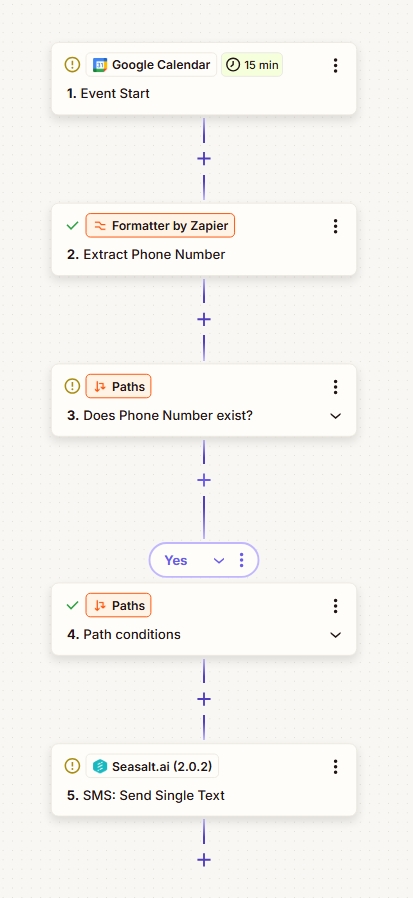
Traditional Workflow – 5 steps
With Agentic Send, this is reduced to 2 steps:
- Trigger: Event Starts.
- Action: Agentic Send (AI handles extraction, validation, and formatting).
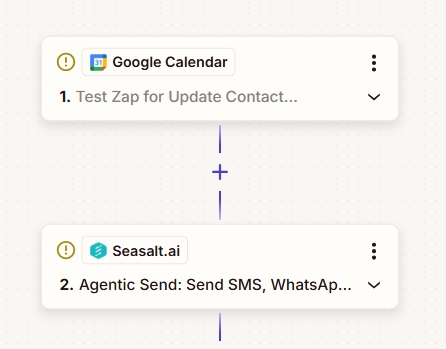
Agentic Workflow – 2 steps
Step-by-Step Instructions
This guide outlines how to configure a Zapier workflow using the Seasalt.ai Agentic Send feature.
Step 1: Set Up the Trigger
The trigger defines the starting point of the automation.
- Select the Trigger App: Choose the application that initiates the workflow (e.g., Google Calendar, Google Sheets, Typeform, Jotform, Google Form, Microsoft Form, or Mailchimp).
- Define the Event: Configure the specific event that activates the Zap (e.g., a new or updated row in Google Sheets, or 15 minutes before a Google event starts).
- Test the Trigger: Execute the trigger to retrieve an example payload, which will contain the raw data output.
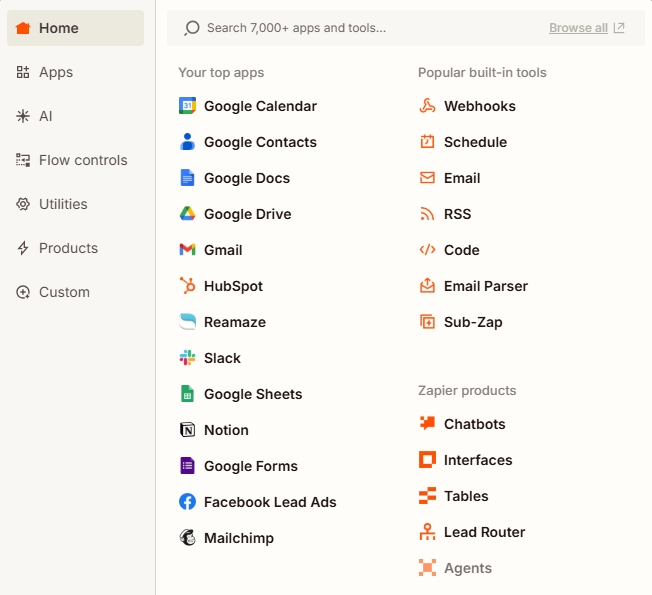
Choose any of 8000+ Zapier triggers
Step 2: Implement the Agentic Send Action
This step replaces all necessary formatters, paths, and manual data matching steps.
- Add the Action Step: Immediately following the trigger, select the Agentic Send action offered by Seasalt.ai.
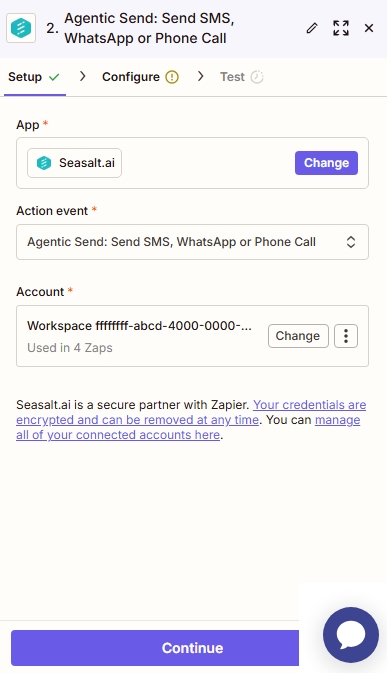
Seasalt.ai Agentic Send Zapier Integration
Step 3: Define the Task using a System Prompt
The core simplification is achieved by telling the agent what to do, rather than manually configuring each task.
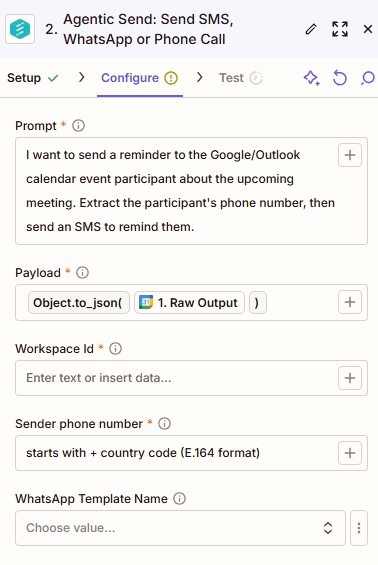
- Write the System Prompt: Input a simple, descriptive prompt detailing the desired action. The language model agent will use this prompt to guide its execution.
- Example 1: “I want to send a reminder to the Google calendar event participant about upcoming meeting.”
- Example 2: “Extract the phone numbers from the participant list then send a SMS to remind them.”
Seasalt.ai Agentic Send Zapier Integration
Step 4: Input the Data Payload
The Agentic Send agent automatically processes the raw data from the trigger output.
- Input the Entire JSON Output: Take the entire JSON payload dump from the preceding trigger step (e.g., the full Google Calendar output) and input it into the Agentic Send action. You do not need to manually parse individual fields from the payload.
- Automated Processing: The language model agent reads the entire dump and figures out the necessary next steps, including:
- Extracting phone numbers from the data.
- Guaranteeing format compliance, such as ensuring phone numbers use the e.164 format (even if the user did not originally put in the country code, which often causes conventional SMS/WhatsApp sending to fail).
- Figuring out the contextual SMS that needs to be sent out.
- Matching the payloads between the initial output and the specific SMS/WhatsApp sending tool.
Step 5: Configure Communication Details
Specify the tool and settings for sending the message.
- Select IDs/Phone Numbers: Select necessary identifiers such as the WhatsApp ID, workspace ID, and the specific phone number used for sending.
- Select Template (if using WhatsApp): If sending via WhatsApp, select the meta-approved template name.
Step 6: Test and Run the Zap
- Test the Action: Test the Agentic Send step to confirm the output.
- Run the Zap: Activate the workflow. The Agentic Send is a “lifesaver and a timesaver for a lot of very very complicated events” by reducing configuration errors and simplifying complexity.
Why Use Agentic Send?
| Feature | Traditional Zapier Setup | Seasalt.ai Agentic Send |
|---|---|---|
| Complexity | High (5+ steps) | Low (2 steps) |
| Data Extraction | Requires “Formatter” steps | AI extracts data automatically |
| Error Handling | Breaks on bad formatting | AI fixes formatting (e.g., adding +1) |
| Logic | Requires “Paths” (If/Then) | AI decides if a number exists |
Common Use Cases
The Agentic Send feature is trigger-agnostic, meaning it works with any of the 7,000+ apps on Zapier.
- Google Sheets: Detect a new row (e.g., a pharmacy order) and parse the row to send a pick-up notification.
- Typeform / Jotform: Instantly text a lead after they submit a contact form, even if they formatted their number weirdly.
- Mailchimp: Trigger an SMS when a user is added to a specific email list.